First of seven posts on how I keep everything I run up to date without trusting fresh releases. The series page lists every published part.
If you install updates the moment they appear, you are among the first people to run every new release, poisoned ones included. Malicious versions of popular packages are usually found and pulled within hours, but only after somebody has installed them.
I decided not to be that somebody, without falling behind on security fixes. A fix for a vulnerability I am actually exposed to skips the wait. Everything else waits: a patch release until it has been public for a week, a minor release two weeks, and a major release a month. Once it has waited and CI passes, it merges itself, unless it is a real breaking change, which waits for me to read it.
Applying that rule is the hard part. Dependency updates reach a machine by many routes, and each route needs a gate of its own. So I start with the easiest: the services I run. They follow a GitOps approach, so every version they ship with is pinned in a git repository, and a merged commit is the only way a new one reaches a machine. All their updates pass through one place, and the tool that changes versions there is Renovate, the most complete dependency-update tool I know.
This post gives you the evidence behind each wait, which kind of update waits how long, and how Renovate enforces it.
Why a week
Two incidents set my numbers:
chalkanddebug, 8 September 2025. An attacker phished an npm maintainer via the lookalike domainnpmjs.helpand poisoned eighteen packages with 2.6 billion weekly downloads between them. Clean versions were out within about two hours.- The Bitwarden CLI, 22 April 2026. The attacker rewrote the publish workflow of the Bitwarden command-line tool so that GitHub Actions minted an npm publishing token on demand, and shipped a credential stealer. It was live for about ninety minutes.
A larger count confirmed them. William Woodruff timed ten recent supply-chain attacks: eight were caught within a week, all but one within two. The exception, xz-utils, stayed hidden for about five weeks after years of preparation, and no wait I would accept stops that.
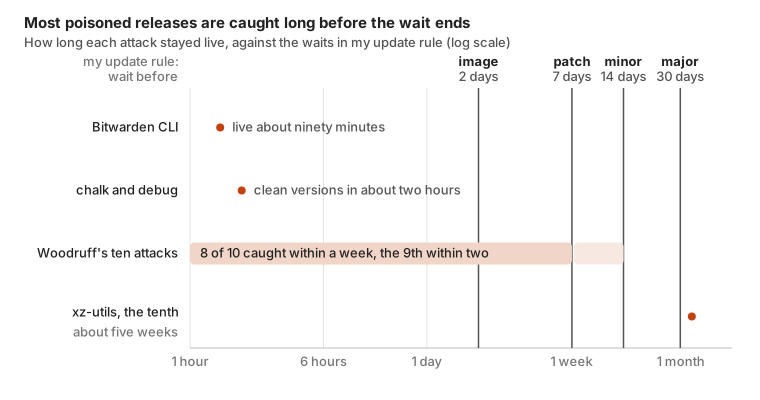
Every dated attack except xz-utils ended before even the 7-day patch wait, most of them within hours.
Waiting a week means arriving after the cleanup and letting registry security teams, scanners and the people who install within minutes pay for the information. Woodruff calls the wait a dependency cooldown and answers the obvious objection (what if everyone waits?) in a follow-up; package managers call it a minimum release age. Xe Iaso adds a freeze: after a burst of serious vulnerabilities, install nothing new for a week or so except the fixes themselves.
The rule
My services’ versions are pinned in lockfiles, Dockerfiles, Kubernetes manifests and Terraform code. Renovate is a bot that finds those dependencies in a repository (libraries, container images, Helm charts, Terraform providers, GitHub Actions), opens a pull request when a new version is published and, if the rules allow it, merges it on its own. Each row is one kind of change:
| What changes | Example | Wait | Merges without me |
|---|---|---|---|
| A language package I run has a known vulnerability | a library moved to the release that fixes a published CVE | none | yes, unless major |
| A held-back image, chart or k3s update removes a vulnerability I run | an image update that drops a fixable critical CVE | none, once the daily scan finds it | yes, unless major (for k3s, patch releases only) |
| An image or Action pinned to the digest its tag already points at | python:3.14-alpine becomes python:3.14-alpine@sha256:… | none | yes |
| An image or package I publish myself | my bitlbee image 5.0.2 to 5.0.3 | none | yes, majors included |
| An image rebuilt under the same tag | the same python:3.14-alpine with a new @sha256 digest | 2 days | yes |
| The weekly lockfile refresh (every transitive dependency) | everything a uv.lock or package-lock.json resolves | 7 days, if the package manager supports it | yes where it does (npm, Poetry, uv); otherwise I merge it, once a month |
| A patch release | the argo-cd Helm chart 10.9.6 to 10.9.7 | 7 days | yes |
| A minor release | the argo-cd Helm chart 10.9.7 to 10.10.0 | 14 days | yes |
| A new language version in a runtime image | python:3.12-alpine to python:3.13-alpine | 14 days, 3 for some floating tags | yes, with CI moved to the same version |
| A major release of a widely used CI action, or of GitHub’s runner image | actions/checkout moving to a new Node.js runtime | 30 days | yes |
| Any other major release | the oci Terraform provider 8 to 9 | 30 days | no, I read it first |
| A new version of an image whose registry publishes no release dates | a digest-pinned image on GitHub’s registry | none possible | no, I read it first |
The reasons, row by row:
- Security fixes, no wait. The gate buys information, and a published advisory is that information arriving. Renovate reads advisories from OSV and GitHub, but only for language packages (npm, PyPI, Go modules and similar), not for container images, Helm charts or k3s. For those, a daily scan in each cluster does the same job, and part five shows how.
- Digest pins and my own releases, no wait. A pin installs nothing new. My own releases already waited out their gates and passed review in their own repository, so waiting again would be waiting twice; that holds for their majors too.
- A rebuilt image, 2 days. Enough for a broken rebuild to be noticed, short enough to take every operating system fix.
- The lockfile refresh, automatic only where the wait holds. It moves every transitive dependency at once, and the package manager picks those versions, not Renovate. So it merges itself only where the package manager can hold it to the same week.
- Patch, 7 days. Longer than both incidents and eight of Woodruff’s ten. A hijacked account does the most damage in a patch, because nobody reads a patch diff.
- Minor, 14 days. Longer than everything but xz-utils, and roughly how long other people’s bug reports take to appear.
- A new language version, together with CI’s. Renovate calls
python:3.12to3.13a minor update, but a new Python removes deprecated APIs, and CI only notices if it runs the new one. Mine often did not: several repositories tested 3.14 while their images shipped 3.15. Now the runtime image and every place CI sets its Python version move in one pull request, so a green build means the version that ships passed the tests. - Major, 30 days and my review. The question is less “is this poisoned” than “what did they remove”. A month brings migration guides; then I read the changelog. The exceptions are majors that rarely remove anything: those of the handful of publishers whose actions half of GitHub runs (nearly always a new Node.js runtime for the action) and of GitHub’s runner images.
- No date, my review. Without a release date there is no age to wait for, so a person reads the release notes instead.
The rule in Renovate
In Renovate configuration the waits look like this; the full version I run is renovate-config.json:
{
  "packageRules": [
    { "matchUpdateTypes": ["patch", "pin"], "minimumReleaseAge": "7 days", "automerge": true },
    { "matchUpdateTypes": ["minor"], "minimumReleaseAge": "14 days", "automerge": true },
    { "matchUpdateTypes": ["major"], "minimumReleaseAge": "30 days", "automerge": false },
    {
      "matchUpdateTypes": ["digest", "pinDigest"],
      "minimumReleaseAge": "1 minute",
      "minimumReleaseAgeBehaviour": "timestamp-optional",
      "automerge": true
    },
    {
      "matchDatasources": ["docker"],
      "matchUpdateTypes": ["digest"],
      "minimumReleaseAge": "2 days"
    }
  ]
}
The 1 minute and timestamp-optional in the digest rule are not decoration: written the obvious way, that rule blocks every digest update without an error, and part three
explains why. Security fixes, the weekly lockfile refresh and GitHub Actions need settings of their own, which part two
goes through along with the rest of the shared preset.
Builds install what git pins
Writing that table took an afternoon. Making it true took months, because Renovate holds back a version by not proposing it: it gates only versions written in a file it updates. With GitOps every version should be in such a file, but a build can still pick its own. Five of my images installed their Python dependencies during the build, from a requirements.txt without versions or straight from pyproject.toml. Each build took the newest matching release, even one published a minute earlier, and Renovate never saw it; two builds of the same commit could ship different code. They now install exactly what the lockfile pins, with hashes, so a commit always builds the same image, and the lockfile is the file Renovate updates.
Release age is not a maintenance window
A release age is about the source: how long a version must have been public before I take it. It says nothing about when the update reaches my machines. That is a maintenance window, the hours in which changes are allowed to land, and where a merge is a deployment you need both. Only my infrastructure repository has one, because only its merges deploy anything; part four sets it.
What it costs
I am always a week or two behind on everything that is not a security fix. For a blog and a homelab that costs nothing. If other people rely on what you run, a week’s wait on patches is a week’s wait on the bug fixes they hit, so pick your number from how fast you need fixes. Even one day would have skipped the poisoned chalk, debug and Bitwarden CLI releases, though not xz-utils.
What to take from this
- Pick a minimum release age and write it down. Seven days suits personal projects and a homelab; shorten it if you need upstream fixes faster.
- Exempt security fixes from the wait, and check what your fast path covers: Renovate’s sees only language packages.
- Do not automerge major versions by default. Wait for migration notes, then read the changelog. Exempt only sources whose majors you have seen are routine.
- Build images from the lockfile. A build that resolves its own dependencies installs releases minutes old, and Renovate never sees them.
A gate covers one path
Renovate gates only what is pinned in git. A package manager on a laptop or a server picks a version itself every time it runs, so a bare npm install -g or pip install takes the newest release, and no pull request ever shows it. That path needs a gate of its own, inside the package manager, and part six
puts one there.
On any path, a gate that breaks raises no error. Either it blocks everything, so updates simply stop, or it lets everything through, so fresh releases arrive without waiting. Neither looks like a failure: no updates reads as a quiet week, and unchecked ones look like any others.