My terminal had a color problem. Starship used one green to mean “git clean.” K9s used a different green for “pod running.” LazyGit used a third green for “staged.” They were different shades chosen by three different maintainers. Functionally, they were the same concept.
I also had a contrast problem. Some tools on dark backgrounds used colors that I would squint at in bright light. Some used colors that disappeared on light backgrounds. Nothing was readable in a consistent way.
I wanted a solution that was not “pick colors that look nice.” I wanted something defensible: colors that are accessible by specification, that are perceptually distinct from each other, and that share semantic meaning across every tool I use.
The result is a palette of 15 semantic roles, defined in the OKLCh color space, each one at least 4.5:1 against both a black and a white background, and rendered into the config of every tool I use from a single [colors] table in .chezmoidata/colors.toml, a data file in my chezmoi dotfiles.

One palette in the light and the dark appearance. Staged and Running are the same green, deleted and CrashLoopBackOff the same red, and both backgrounds read.
The semantic vocabulary
Instead of thinking about colors directly, I think about roles. Each one is named for what it means, never for how it looks:
| Role | Meaning | Used for |
|---|---|---|
error | Something failed | Failed commands, deleted files, conflicts, failed pods |
warning | Needs attention | Modified files, search hits, the 75% disk tier |
success | Went fine | Staged files, OK status, anything up or enabled |
identity | Who | Usernames, authors, field labels, keys and certificates |
system | The machine | Hostnames, IPs, ports, device files |
cloud | Somewhere else | Azure context, git remote branches |
orchestration | Kubernetes and Docker | Cluster context, k9s chrome |
iac | Infrastructure as code | Terraform and OpenTofu, syntax keywords |
build | Artifacts and numbers | Packages, versions, counts, templates |
execute | Things that run | Executables, runtimes, commands in hints |
environment | Configuration | $VAR, config files, strings |
isolation | Contained or linked | Containers, namespaces, symlinks |
navigation | Where | Paths, directories, URLs, the active pane |
vcs | Version control | Git branches |
subtle | Passive | Timestamps, durations, hints, borders at rest |
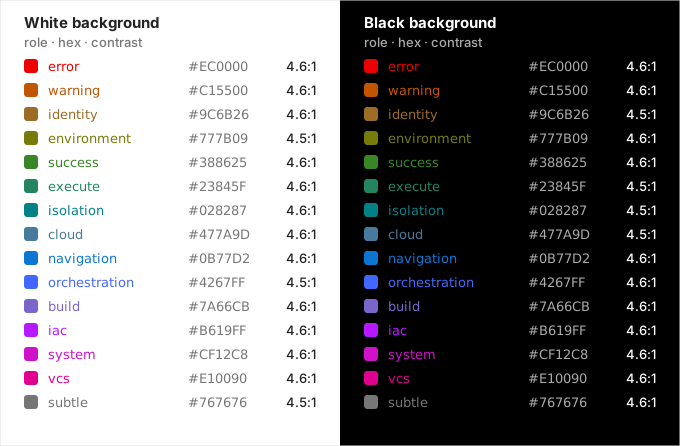
The 15 roles in hue order. Each clears 4.5:1 on both backgrounds, none by more than 0.13.
Every tool gets configured using this vocabulary. error is always the same red. success is always the same green. When a Kubernetes pod fails and the exit code of a command is non-zero, they are the same color, because they represent the same concept.
Roles alone were not enough, though. Each tool still decided which role a thing got, and they did not always agree. A healthy pod was green in kubectl get pods and plain in k9s. A traceroute hop with no reply was gray in one tool and amber in another. A process state, a log level and a column header changed color from tool to tool. So the repo also keeps a concept table: one row per thing that several tools show (a pod, a running process, a lost ping, an HTTP status, an inode, a log level), with its role and whether it may be bold. A tool may leave a concept out, but it may not color it differently. When a tool cannot follow a row, the doc says why. k9s colors whole rows by status, so a pod’s name there is green, not the Kubernetes blue it has everywhere else.
Color is never the only signal, though. The red, amber and green status roles are indistinguishable for many people with color vision deficiency when they share a lightness, so every state also carries a glyph (❯, ✗, ✓, ⚠) or a word.
The color space: OKLCh
Most theme designers work in hex or HSL. The problem with HSL is that equal steps in saturation and lightness do not correspond to equal perceived differences. A color that looks bright to human vision in one hue range looks dull in another, even at the same numeric HSL values.
OKLCh fixes this. It is a perceptually uniform color space derived from the OKLab model. The three components are:
- L (lightness): perceptually uniform, 0 to 1
- C (chroma/saturation): 0 to ~0.37
- h (hue angle): 0 to 360°
Colors at the same L value are perceptually the same brightness. Colors at the same C value are perceptually the same saturation. This makes it possible to compute a color from a meaning instead of picking it by eye.
WCAG AA on black and white
WCAG AA requires a contrast ratio of at least 4.5:1 between text and background. My terminal, Ghostty, follows the macOS appearance: a white background by day, a black one at night. I did not want tools switching colors with it, so one palette has to pass on both.
That pins every color to a narrow band. 4.5:1 on white caps relative luminance at about Y = 0.183, and 4.5:1 on pure black needs at least Y = 0.175. Every role sits in that band, at a target of Y = 0.179, which is roughly OKLab L = 0.56. The two only overlap on a near-black background, so the dark theme uses #000000. On a softer dark gray like Terminal.app’s #1E1E1E the palette drops to about 3.6:1, and the validator reports that rather than failing on it.
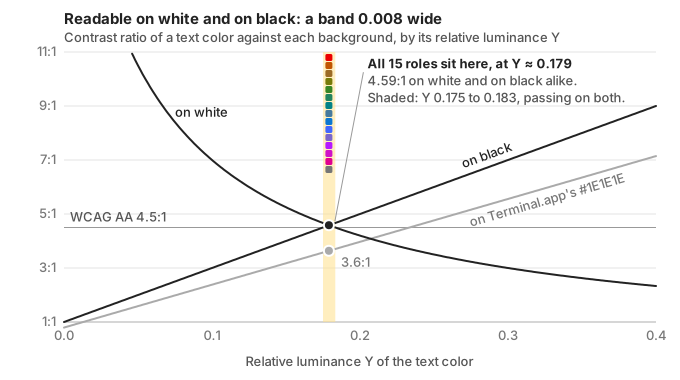
Lighter text loses contrast on white and gains it on black. Only Y 0.175 to 0.183 passes on both, and on Terminal.app’s dark gray that same band reaches 3.6:1.
The price of one band is that hue is the only thing telling roles apart. The upside is that any role works as a fill: a color at that luminance contrasts with both black and white text, so a colored badge can take the terminal’s default foreground in either appearance. The reverse holds too: a gray fill under colored text nearly disappears, because the gray and the text sit at the same luminance. So the current row in fzf and the other terminal tools is drawn in reverse video instead of on a gray bar.
I tried an optimizer first
The first version did this the clever way. It searched hue and chroma with scipy’s differential_evolution, maximizing the summed perceptual distance (ΔE in OKLab) between roles, with hard penalties for any color that missed the contrast target or collapsed into another under simulated deuteranopia.
It produced a valid palette, and I replaced it a few months later. A global optimizer moves everything at once: nudge one role and the search reshuffles roles I had not touched, and it pulls colors off their mnemonics (Terraform violet, git magenta) to gain a little distance. I ended up pinning role after role by hand to stop that, until the optimizer was choosing four colors out of fifteen. A hand-tuned palette and a global search pull in opposite directions.
Now each role is rendered on its own from two numbers, a hue and a chroma expressed as a fraction of the most saturated in-gamut color at that lightness. The third field says why the hue was picked:
ROLE_SPECS: dict[str, RoleSpec] = {
    "error": RoleSpec(29.1, 1.00, "Universal stop / danger; loudest, so max chroma"),
    "warning": RoleSpec(48.0, 1.00, "AWS orange (`#FF9900`) as amber caution"),
    "navigation": RoleSpec(252.0, 0.97, "Finder directories and hyperlinks: azure"),
    "cloud": RoleSpec(240.0, 0.60, "Azure soft sky; muted sub-role of `navigation`"),
    "iac": RoleSpec(310.1, 1.00, "Terraform/HashiCorp (`#7B42BC`) violet"),
    "subtle": RoleSpec(0.0, None, "Passive metadata gray (achromatic)"),
    # ...
}
The renderer binary-searches the lightness that lands on the luminance target for that hue and chroma, so contrast holds by construction. There is no search over the palette and no randomness: the same table produces byte-identical output every run, and changing one role changes only that color. Chroma does the work hue cannot. navigation and cloud are both blue, one vivid and one muted.
The script, palette.py, still measures what the optimizer used to chase. It reports the worst-case separation between roles under simulated deuteranopia, protanopia and tritanopia, but only as information: at a fixed lightness, 15 colors cannot all stay distinct for dichromats, and the glyphs cover the status roles.
One source, every config
Every tool config is templated from the same color values in .chezmoidata/colors.toml, a plain data file that chezmoi loads into every template. When chezmoi applies the dotfiles, it renders each config file by substituting the palette values:

# In .chezmoidata/colors.toml
[colors]
error         = "#EC0000"
warning       = "#C15500"
success       = "#388625"
orchestration = "#4267FF"
iac           = "#B619FF"
# ...# In .chezmoitemplates/k9s/skin, rendered to ~/.config/k9s/skins/semantic.yaml
k9s:
body:
fgColor: default
bgColor: default
logoColor: "{{ .colors.orchestration }}"
info:
sectionColor: "{{ .colors.identity }}"
cpuColor: "{{ .colors.build }}"Same for Starship (TOML), LazyGit (YAML), Btop (theme file), the SQL clients (one shared [colors] block), Atuin (TOML), and so on.
Changing the success color updates every tool after one chezmoi apply. No hunting through config files manually.
Tools covered
The palette reaches about forty tools. The ones that read hex values include Starship, tmux, k9s, lazygit, btop, bat and delta, lazydocker, Atuin, fzf, eza and LS_COLORS, yazi, glow, fastfetch, pgcli, mycli and litecli, the Zsh syntax highlighter, and the chrome of Ghostty, Zed, VS Code and zellij.
Tools that only accept ANSI color names, such as htop or man pages, get the palette through the terminal itself: Ghostty’s 16 ANSI slots are mapped to roles (slot 1 is error, slot 4 is navigation), so naming “red” gets the palette red. A few tools cannot be themed at all; iredis hardcodes its styles.
tmux needs one more step. Its status bar draws pills on a transparent bar, so it cannot rely on the terminal’s foreground. palette.py derives a separate [colors_tmux] table from the main palette: neutral fills with an explicit text color, and darker shades of the role hues where text sits on a fill. Every text-on-fill pair is checked at 4.5:1, against both a white and a black terminal.
Running the generator
uv run --script scripts/palette.py --writeThis regenerates the whole palette from ROLE_SPECS, including the UI chrome keys and the tmux table, and writes it into .chezmoidata/colors.toml. It also regenerates the role table (hex, hue, chroma and the reason for each hue) in the repo’s color documentation, so the docs cannot quote a stale hex value. Then chezmoi apply updates every tool.
uv run --script scripts/palette.py --validate-onlyThis reports whether the current palette passes every contrast check, and whether that documentation table and the derived tables still match, and exits non-zero if not. A pre-commit hook runs it whenever colors.toml, palette.py or the color doc changes, and CI runs it too.