Most SSH hardening guides stop at key-only auth and fail2ban. That helps, but if your machine has a public IP, port 22 is still open to the internet. Every automated scanner can probe it and get a response: the SSH version string, the banner, proof that something is listening.
The log noise alone is annoying: even with key-only auth, failed attempts pile up every day. But the bigger problem is exposure. If a zero-day drops in OpenSSH, every server with port 22 open is a target before you have time to patch. That has happened before.
I wanted the SSH daemon itself to be unreachable: no banner, no version string, nothing for nmap to work with. Not just rate-limited or hidden behind a non-standard port, but genuinely not connectable unless you already hold the key.
The idea: port knocking, and why it is not enough on its own Link to heading
Port knocking is the original approach to this problem. The idea is simple: the server watches for a specific sequence of connection attempts on closed ports. If a client connects to port 7000, then 8000, then 9000, the server recognizes the pattern and temporarily opens a real port, like 22.
It works, but it has a real weakness: the knock sequence travels in the clear. Anyone watching your traffic can capture the sequence and replay it. There is no authentication, only obscurity.
fwknop solves this with Single Packet Authorization (SPA). Instead of a knock sequence, you send a single UDP packet that is encrypted and cryptographically signed with an HMAC. The server only opens port 22 if it can verify the packet came from someone holding the right keys.
How Single Packet Authorization works Link to heading
Before SSH is accessible at all, you send one encrypted UDP packet to the server. fwknopd validates the packet and temporarily inserts a firewall rule that opens port 22 for your source IP only, for a configurable time window (I use 120 seconds). After that window, the rule is removed automatically. If you are already connected, the session stays up because the connection was established before the rule disappeared.
From a scanner’s perspective, port 22 never responds. nmap reports it as filtered, the same state as any silently dropped packet. No banner, no RST, no confirmation that SSH is even listening there.
Because SPA uses UDP, the packet can be lost in transit. If SSH hangs on connect, run fwknop -n server1 again and retry. It is stateless, so resending is safe.
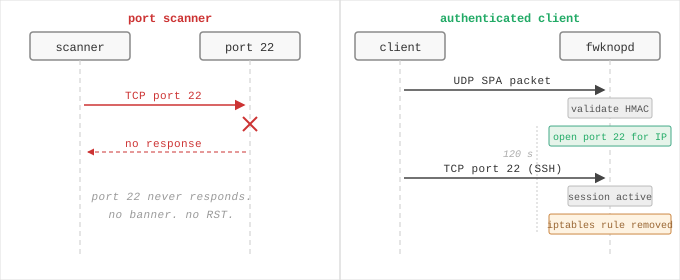
Left: a port scanner gets no response. Right: a valid SPA packet opens port 22 for the client’s IP for 120 seconds, then closes it again.
The SPA packet itself is HMAC-SHA512-authenticated and encrypted. Replaying a captured packet does not work: the packet contains a timestamp and a single-use sequence counter. fwknopd checks both, and drops the packet silently if either fails.
Generating keys Link to heading
You need two keys: an encryption key and an HMAC key. The encryption key protects the contents of the SPA packet. The HMAC key authenticates it. They serve different purposes and should be separate; using the same key for both weakens the security properties of the scheme.
Key generation is a one-time step, and you need the output before configuring either side:
fwknop --key-gen
This outputs something like:
KEY_BASE64:       <long-base64-string>
HMAC_KEY_BASE64:  <long-base64-string>
Store both keys somewhere you can retrieve them later: you will need them on the server (via Ansible vault) and on every client machine. I keep them in Ansible vault as vault_fwknop_spa_key and vault_fwknop_hmac_key, and mirrored in Bitwarden as shared/fwknop_spa_key and shared/fwknop_hmac_key. The two stores serve different tools: Ansible reads from its own vault when deploying the server side, while chezmoi queries Bitwarden when populating ~/.fwknoprc on client machines. Same keys, two entry points.
One key pair covers all hosts. Each host runs the same fwknopd configuration pointing to the same shared keys. If you want per-host keys you can use separate stanzas in the access file, but one shared pair is simpler to rotate.
Deploying the server side with Ansible Link to heading
My Ansible role for this is fwknop_server. It installs fwknop-server, deploys the server configuration and access file, and adjusts UFW rules.
The key part of the tasks file:
- name: Install fwknop-server
  apt:
    name: fwknop-server
    state: present

- name: Deploy fwknopd.conf
  template:
    src: fwknopd.conf.j2
    dest: /etc/fwknop/fwknopd.conf
    owner: root
    group: root
    mode: "0600"

- name: Deploy access.conf
  template:
    src: access.conf.j2
    dest: /etc/fwknop/access.conf
    owner: root
    group: root
    mode: "0600"
  no_log: true

- name: Remove public SSH UFW rule
  ufw:
    rule: limit
    port: "{{ fwknop_ssh_port | default(22) }}"
    proto: tcp
    delete: yes

- name: Allow fwknop SPA port (UDP)
  ufw:
    rule: allow
    port: "{{ fwknop_spa_port }}"
    proto: udp
The public SSH UFW rule gets removed after fwknop is deployed. From that point, iptables only opens port 22 when a valid SPA packet arrives. fwknopd does this by inserting iptables rules directly, beneath UFW’s management layer, so the temporary rules are invisible to ufw status.
The defaults:
fwknop_spa_port: 62201
fwknop_access_timeout: 120 # seconds
fwknop_ssh_port: "{{ ssh_port | default(22) }}"
fwknop_access_timeout flows into access.conf.j2 as the FW_ACCESS_TIMEOUT value, which tells fwknopd how long to keep the firewall rule open after a valid SPA packet. (ACCESS_EXPIRE is a different directive: it sets when the stanza stops accepting SPA packets altogether.)
The client configuration Link to heading
The client side is ~/.fwknoprc, which chezmoi manages and populates with keys from Bitwarden at apply time. The file has a stanza per host:
[default]
SPA_SERVER_PROTO     udp
HMAC_DIGEST_TYPE     SHA512
USE_HMAC             Y
ALLOW_IP             resolve
ACCESS               tcp/22
KEY_BASE64           {{ (bitwarden "item" "shared/fwknop_spa_key").fields.value }}
HMAC_KEY_BASE64      {{ (bitwarden "item" "shared/fwknop_hmac_key").fields.value }}

[server1]
SPA_SERVER           203.0.113.10
SPA_SERVER_PORT      62201

[server2]
SPA_SERVER           server2.example.com
SPA_SERVER_PORT      62201
ALLOW_IP resolve tells fwknop to detect your current public IP automatically. The keys are base64-encoded and come from the generation step above.
Wiring it into ~/.ssh/config Link to heading
The knock can be made fully transparent by adding a ProxyCommand to each host in ~/.ssh/config. Once this is in place, ssh server1 just works: the SPA packet goes out, the port opens, SSH connects.
Host server1
  HostName 203.0.113.10
  ProxyCommand fwknop -n server1; sleep 2; nc %h %p

Host server2
  HostName server2.example.com
  ProxyCommand fwknop -n server2; sleep 2; nc %h %p
fwknop -n server1 selects the [server1] stanza from ~/.fwknoprc to know where to send the SPA packet. The sleep 2 gives fwknopd time to update iptables before nc (netcat) opens the actual TCP connection to the now-unblocked port.
Wiring it into Ansible Link to heading
Initial provisioning of a new machine uses plain SSH: fwknop is not installed yet, so the connection is direct. Once the fwknop_server role runs and the UFW rule is removed, every subsequent Ansible run needs to knock first.
I handle this by setting ansible_ssh_common_args in group_vars/linux/vars.yaml:
ansible_ssh_common_args: >-
  -o ProxyCommand="fwknop -n %h; sleep 2; nc %h %p"
  -o StrictHostKeyChecking=accept-new
  -o ConnectTimeout=10
%h is the inventory hostname, which matches the stanza name in ~/.fwknoprc. After the first provisioning run, all subsequent plays go through this path automatically.
Tailscale as a parallel access path Link to heading
Alongside fwknop, the Tailscale interface (tailscale0) always permits SSH with no knock required. This is not a fallback for when fwknop breaks; it is a separate access path that exists independently.
In practice it covers one scenario well: if a configuration mistake locks out the public interface, any Tailscale-connected device can still reach the machine over the tailnet.
# UFW rule added by the tailscale role
ufw allow in on tailscale0 to any port 22
What this actually changes Link to heading
Before: port 22 open, fail2ban watching for brute-force attempts, log noise every day. A zero-day in OpenSSH is a real problem you have to respond to immediately.
After: port 22 is invisible to the internet. No banner to grab. No connection attempts in auth logs because there is nothing to connect to. The attack surface shrinks to the fwknop UDP port, which drops anything that does not validate as a properly signed SPA packet. A zero-day in OpenSSH still matters, but the exposure window is different: an attacker cannot even reach the SSH daemon without the key.
This is not security through obscurity. The port is not hidden behind some clever port number. It is genuinely closed. The SPA packet is what proves you belong there, the same way a key proves you belong inside a locked room. The obscurity is just a side effect. And from the outside, ssh server1 still works as it always did: the knock is invisible inside the ProxyCommand.